

Quick Brief
- ROG Strix Aiolos achieves 20Gbps transfer speeds via USB 3.2 Gen 2×2 double the Arion’s performance
- Dual M.2 interface supports both NVMe PCIe and SATA SSDs in 2242/2260/2280 sizes
- Liquid-silicone-rubber coating provides heat resistance and dust protection during extended use
- Announced February 2026 with exclusive ROG SSD Dashboard for real-time drive monitoring
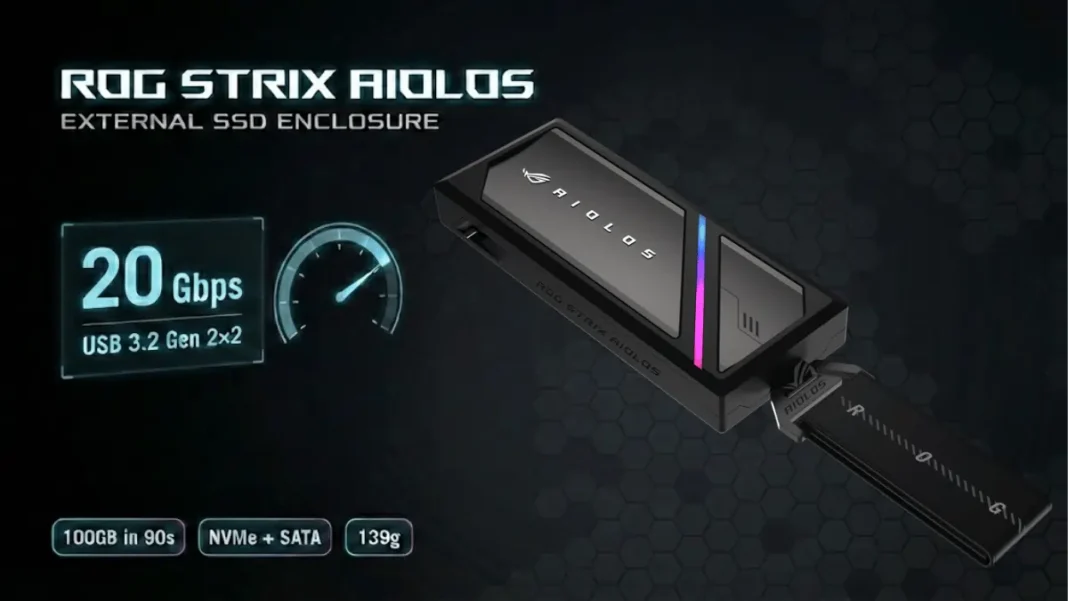
ASUS fundamentally redefined portable gaming storage with the ROG Strix Aiolos, an external SSD enclosure that delivers 20Gbps speeds while maintaining cool temperatures through dual-layer thermal engineering. Announced February 5, 2026, the Aiolos targets gamers and content creators who transfer massive game libraries and 4K video files daily. This enclosure doubles the transfer rate of its predecessor, the ROG Strix Arion, while adding SATA SSD compatibility and professional-grade thermal management.
Transfer Speed Leap: 20Gbps Performance Explained
The ROG Strix Aiolos implements USB-C 3.2 Gen 2×2 connectivity to achieve 20Gbps throughput, a 100% increase over the 10Gbps Arion model. According to ASUS internal testing, the enclosure transfers 100GB of data in 90 seconds under optimal conditions. The dual M.2 interface accepts NVMe PCIe SSDs (M Key) and M.2 SATA SSDs (B+M Key) across three form factors: 2280, 2260, and 2242.
The versatile interface design eliminates the need for separate enclosures when upgrading from SATA to NVMe storage users simply swap drives using the tool-free mechanism. The enclosure accommodates SSDs up to 8TB capacity based on currently available M.2 drives.
What makes USB 3.2 Gen 2×2 faster than standard USB-C?
USB 3.2 Gen 2×2 utilizes two 10Gbps lanes simultaneously instead of one, creating a 20Gbps pipeline. This dual-lane architecture requires compatible host controllers found in recent motherboards and laptops. The Aiolos automatically detects the host interface speed and adjusts accordingly, maintaining backward compatibility with older USB standards.

Thermal Engineering: Dual-Layer Cooling System
ASUS engineered a two-stage cooling solution to prevent thermal throttling during intensive transfers. An internal high-efficiency thermal pad makes direct contact with the M.2 SSD, drawing heat away from the NAND controller and DRAM cache. The enclosure operates within 0–40°C (32–104°F) ambient temperature range and stores safely between -40–60°C (-40–140°F).
The external layer features injection-molded liquid-silicone-rubber coating that provides heat dissipation, dust barrier, and smudge resistance that maintains the enclosure’s appearance during daily use. This material choice addresses common complaints with aluminum enclosures that become uncomfortably hot during extended workloads.
ROG SSD Dashboard: Real-Time Storage Management
ASUS developed exclusive monitoring software that provides instant visibility into drive health and performance metrics. The ROG SSD Dashboard displays real-time temperature, transfer speeds, total bytes written, and remaining drive lifespan through a custom interface optimized for ROG hardware. Users access the dashboard via web interface without installing desktop applications compatible with Windows 10/11 and macOS 14.4+ systems.
The dashboard automatically alerts users when temperatures exceed safe thresholds or when drive health indicators signal potential failure. Performance graphs track speed consistency across sessions, helping users identify bottlenecks in their specific setup.
Design Innovation: Tool-Free Installation and Portability
The Aiolos features a push-to-open mechanism that exposes the M.2 slot without requiring screwdrivers or plastic prying tools. This design enables quick drive swaps practical for photographers and videographers who rotate storage based on active projects. The enclosure measures 115.5 x 46 x 15.12mm and weighs 139 grams, fitting easily into laptop bags or camera cases.
ASUS included a reinforced metal hook with fabric tag rated for five times the tensile strength of the previous Arion model. This hook attaches securely to backpack loops or belt clips, reducing the risk of accidental drops during transport. Additional accessories include an ROG-branded strap with refined fabric tag and a braided USB-C cable.
RGB Lighting and Aesthetic Customization
Customizable Aura RGB lighting runs along the enclosure’s edge, synchronized with other ROG peripherals through the Aura Sync ecosystem. Users configure lighting effects, colors, and brightness through a web-based interface accessible on any device. Lighting modes include static, breathing, color cycle, and reactive patterns that pulse with data transfer activity.
The lighting system can be completely disabled for users prioritizing minimal power consumption when connecting to laptops. The Aura system integrates with existing ROG setups, creating unified lighting themes across keyboards, mice, and monitors.
Comparison: ROG Strix Aiolos vs. Leading Alternatives
| Feature | ROG Strix Aiolos | UGREEN 20Gbps RGB | UGREEN 40Gbps Fan |
|---|---|---|---|
| Max Speed | 20Gbps | 20Gbps | 40Gbps |
| Interface | USB 3.2 Gen 2×2 | USB 3.2 Gen 2×2 | Thunderbolt 4/USB4 |
| SSD Support | NVMe + SATA | NVMe + SATA | NVMe only |
| Cooling | Thermal pad + silicone coating | Thermal pad + aluminum | Pad + fan + aluminum |
| RGB | Aura Sync | Auto gradient | None |
| Tool-Free | Yes | No | No |
| Software | ROG SSD Dashboard | None | None |
| Weight | 139g | Not specified | Heavier (fan) |
The Aiolos occupies the premium segment with exclusive software and SATA compatibility absent from competing 20Gbps models. UGREEN’s 40Gbps enclosure delivers higher theoretical speeds but requires Thunderbolt 4 hosts and lacks SATA support.
Specifications and Compatibility
The ROG Strix Aiolos (model ESD-S1W) operates on 5V DC power supplied via the USB-C connection. Operating temperature range spans 0–40°C (32–104°F), with storage rated for -40–60°C (-40–140°F). Windows 11/10 and macOS 14.4 or later receive full support, while Aura RGB customization requires Windows 10 Creators Update (1903) or Windows 11.
Performance scales with the host system’s USB implementation 20Gbps requires USB 3.2 Gen 2×2 controllers, while older USB 3.1 Gen 2 systems operate at 10Gbps, USB 3.1 Gen 1 provides 5Gbps, and USB 2.0 operates at 480Mbps. The enclosure supports M.2 SSDs with M Key (PCIe NVMe) and B+M Key (SATA) configurations.
Practical Use Cases and Performance Scenarios
Content creators transferring 8K footage benefit from sustained 20Gbps speeds that prevent workflow bottlenecks. Game library management becomes practical with the Aiolos ASUS testing demonstrates 100GB transfers complete in 90 seconds when using high-performance NVMe drives. Photographers working with high-resolution raw files experience improved performance when editing directly from the enclosure.
The SATA compatibility provides a migration path for users upgrading older laptops extract the existing SATA M.2 drive and repurpose it as external storage instead of discarding functional hardware. System builders can test NVMe drives outside of PC builds using the tool-free installation, speeding up diagnostics and firmware updates.
Limitations and Considerations
The liquid-silicone coating, while durable, may attract lint from fabric bags more readily than smooth aluminum finishes. RGB lighting adds visual appeal but serves no functional performance benefit. Users must ensure their host system includes USB 3.2 Gen 2×2 support to achieve full 20Gbps speeds older systems will operate at reduced bandwidth.
ASUS has not disclosed pricing or global availability details beyond the February 2026 announcement. The enclosure requires purchasing a separate M.2 SSD, which must be factored into the total storage solution cost. Storage temperature tolerance of -40–60°C makes the Aiolos suitable for extreme environments, though operating temperatures must remain within 0–40°C.

Frequently Asked Questions (FAQs)
What transfer speed does the ROG Strix Aiolos achieve with NVMe SSDs?
The Aiolos reaches 20Gbps maximum throughput with compatible USB 3.2 Gen 2×2 hosts. ASUS internal testing shows 100GB transfers complete in 90 seconds using high-performance NVMe drives.
Does the Aiolos support SATA and NVMe SSDs simultaneously?
No, the enclosure accepts one M.2 drive at a time. The dual interface design accommodates either NVMe (M Key) or SATA (B+M Key) protocols, but not both concurrently.
What temperature range can the Aiolos operate in?
The enclosure operates in ambient temperatures from 0–40°C (32–104°F). Storage temperature tolerance extends from -40–60°C (-40–140°F) when not powered.
Is the ROG SSD Dashboard compatible with non-ASUS SSDs?
Yes, the dashboard works with any M.2 SSD installed in the Aiolos enclosure. Monitoring functions access standard S.M.A.R.T. data available across all modern SSDs.
How much stronger is the metal hook compared to the previous Arion model?
ASUS rates the Aiolos hook at five times the tensile strength of the Arion model’s attachment system, providing enhanced durability for mobile use.
Will older USB-C ports work with the Aiolos at reduced speeds?
Yes, the enclosure maintains backward compatibility. USB 3.1 Gen 2 ports deliver 10Gbps, USB 3.1 Gen 1 provides 5Gbps, and USB 2.0 operates at 480Mbps.
Can I disable RGB lighting to conserve power?
RGB lighting can be turned off completely through the Aura web interface, reducing overall power consumption when connected to battery-powered devices.
When will the ROG Strix Aiolos be available for purchase?
ASUS announced the Aiolos on February 5, 2026. Retail availability dates and regional pricing have not been disclosed as of the announcement.

