

Key Takeaways
- Supabase recommends X OAuth 2.0 over legacy OAuth 1.0a, with deprecation planned for future releases
- OAuth 2.0 eliminates complex signature requirements through HTTPS-based security
- Setup follows three documented steps: X Developer Dashboard configuration, Supabase credentials, and client code
- X OAuth 2.0 requires PKCE (Proof Key for Code Exchange) for user authentication flows
Supabase has positioned X OAuth 2.0 as the primary authentication method for Twitter integration, marking a decisive shift from the legacy OAuth 1.0a protocol. The platform’s documentation explicitly states that OAuth 1.0a “will be deprecated in future releases,” pushing developers toward the OAuth 2.0 standard. This transition reflects broader industry trends where simplicity meets enhanced security through modern cryptographic approaches
Why Supabase Prioritizes OAuth 2.0 Over OAuth 1.0a
OAuth 2.0 represents a complete architectural rewrite that addresses OAuth 1.0’s complexity barriers. The legacy OAuth 1.0a required developers to sign every API request with cryptographic signatures using consumer secrets. This process demanded intricate calculations that increased implementation difficulty when HTTPS already encrypted communications.
OAuth 2.0 eliminates signature generation by relying exclusively on HTTPS for transport security. Developers include client secrets as standard HTTP headers rather than generating complex signatures. X’s OAuth 2.0 implementation requires PKCE (Proof Key for Code Exchange) to prevent authorization code interception attacks. Twitter announced OAuth 2.0 with PKCE as Generally Available in December 2021.
The token architecture differs fundamentally between versions. OAuth 1.0a issued long-lived access tokens that could remain valid without expiration. OAuth 2.0 introduces access tokens paired with refresh tokens, enabling token-based security where refresh tokens acquire new credentials without re-authorization.
What are the scope advantages in X OAuth 2.0?
X OAuth 2.0 provides granular permission control through scopes, allowing developers to request specific API capabilities. Users see exactly what data and actions the application requests during authorization. OAuth 1.0a offered only three fixed access levels: read, read-write, and read-write-direct messages. This precision improves user trust and compliance with data minimization principles.

Setting Up X OAuth 2.0 in Supabase: Three-Phase Implementation
Supabase’s X OAuth 2.0 integration follows a structured three-part process documented in their official authentication guides.
Phase 1: X Developer Dashboard Configuration
Navigate to the X Developer Dashboard and create an OAuth 2.0 application under your project settings. Enable three-legged authentication to allow user authorization flows. Request email address permissions if your application requires user email data.
Retrieve your callback URL from the Supabase dashboard by accessing Authentication → Providers → X/Twitter OAuth 2.0. The callback follows this format: https://<project-ref>.supabase.co/auth/v1/callback. Copy this URL into your X application’s authorized redirect URIs to complete the OAuth flow circuit.
Phase 2: Supabase Credential Integration
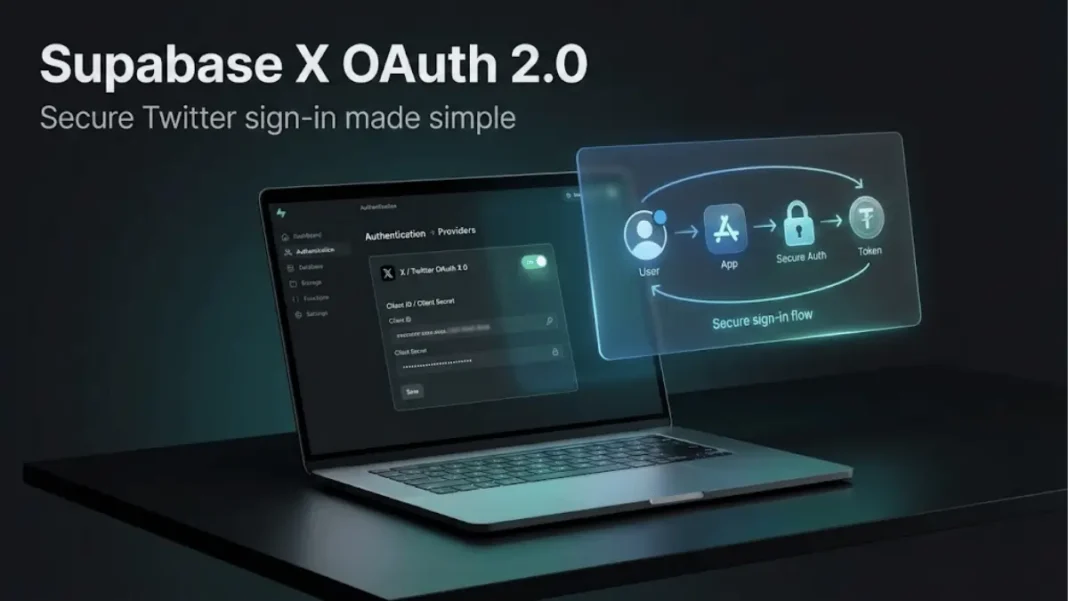
Access your Supabase project dashboard and navigate to the Authentication section. Under Providers, expand the X/Twitter OAuth 2.0 settings. Toggle the provider to “Enabled” and paste your X Client ID and Client Secret obtained from the Developer Dashboard.
Developers can alternatively configure X OAuth 2.0 through the Supabase Management API using PATCH requests to /v1/projects/$PROJECT_REF/config/auth with parameters external_x_enabled, external_x_client_id, and external_x_secret. This approach enables automated infrastructure-as-code deployments.
Phase 3: Client Application Code
Implement the Supabase Auth client library with X provider specification in your application’s sign-in flow. The authentication process redirects users to Twitter for authorization, then returns to your application with tokens. Access tokens grant API capabilities while ID tokens provide user identity information.
How does X OAuth 2.0 handle user-context authentication?
Supabase X OAuth 2.0 integration has limitations with Twitter API operations requiring user-context authentication. Developer reports from September 2024 confirm that provider tokens from Supabase authentication fail when passed as Bearer tokens to X endpoints requiring “OAuth 2.0 User Context”. X platform distinguishes between application-only authentication (read-only public data) and user-context authentication (actions on behalf of users). Applications needing full user-context capabilities must implement custom OAuth flows beyond Supabase’s standard provider integration.
OAuth 2.0 vs OAuth 1.0a: Technical Comparison
| Dimension | OAuth 2.0 | OAuth 1.0a |
|---|---|---|
| Security Model | HTTPS-based transport encryption | Cryptographic signatures per request |
| Implementation Complexity | Simplified with standard HTTP headers | Complex signature calculations required |
| Token Lifecycle | Access tokens + refresh tokens | Long-lived tokens |
| Scope Granularity | Fine-grained permission requests | Three fixed access levels |
| PKCE Requirement | Mandatory for X since December 2021 | Not applicable |
| Supabase Status | Recommended provider | Deprecation planned |
OAuth 2.0’s reliance on SSL/TLS for security represents a paradigm shift from OAuth 1.0’s signature-based approach. OAuth 2.0 requires only one security token per API call versus OAuth 1.0’s two tokens plus signature.
Supabase OAuth 2.1 Server Capabilities: Identity Provider Features
Supabase expanded its authentication architecture in December 2025 by implementing OAuth 2.1 authorization server capabilities. This enhancement allows Supabase projects to function as identity providers for third-party applications, enabling “Sign in with Your App” functionality.
The OAuth 2.1 implementation supports the authorization code flow with PKCE and refresh token flow. Third-party applications redirect users to Supabase Auth’s authorize endpoint, where Supabase validates OAuth parameters and redirects to your configured authorization URL. Your frontend displays a consent screen, and upon approval, Supabase generates authorization codes that clients exchange for access tokens, refresh tokens, and ID tokens.
Developers register OAuth clients through the Supabase dashboard or Management API, configuring allowed redirect URIs and receiving client IDs. Access tokens are JWTs containing standard Supabase claims, and clients validate these tokens using public keys from the JWKS endpoint. This architecture positions Supabase as a comprehensive authentication platform beyond simple social login integration.
Common Implementation Challenges and Solutions
Email Address Requirements
X OAuth integration fails when Twitter users haven’t connected email addresses to their accounts. Supabase’s authentication system initially expected email as a unique identifier across social providers. The platform resolved this by supporting user identification through provider-specific UIDs and provider IDs rather than mandating email. Developers should implement fallback identification strategies when email availability varies.
State Parameter Validation Errors
GitHub issues document invalid_request errors related to state parameter handling in X OAuth 2.0 flows. These errors occur when callback URLs contain mismatched state values between authorization requests and responses. Verify that your application preserves state parameters across the OAuth redirect chain and that X Developer Portal callback URLs exactly match Supabase configuration.
HTTPS Enforcement
OAuth 2.0’s security model requires HTTPS for all authentication endpoints. Development environments using HTTP localhost URLs may encounter OAuth flow failures. Use local HTTPS proxies or cloud-based staging environments that support SSL certificates during X OAuth testing.
Provider Deprecation Precedents
Supabase has established deprecation patterns for OAuth providers. When Slack v1 OAuth was deprecated in December 2024, Supabase announced a two-year sunset period with full termination planned for March 2026. This precedent suggests OAuth 1.0a for Twitter will follow similar timelines once specific deprecation dates are announced.

Frequently Asked Questions (FAQs)
What is the primary difference between X OAuth 2.0 and OAuth 1.0a?
OAuth 2.0 uses HTTPS transport encryption instead of per-request cryptographic signatures required by OAuth 1.0a. This simplification reduces implementation complexity while maintaining security for applications that protect client secrets. OAuth 2.0 also introduces access tokens with refresh token mechanisms versus OAuth 1.0a’s long-lived credentials.
Does Supabase support Twitter OAuth 1.0a?
Supabase documentation states the legacy Twitter OAuth 1.0a provider “will be deprecated in future releases”. The platform recommends migrating to X OAuth 2.0 for new projects. Based on Supabase’s Slack OAuth deprecation precedent (two-year sunset period), OAuth 1.0a may continue functioning until specific termination dates are announced.
How do I obtain X OAuth 2.0 credentials for Supabase?
Create an OAuth 2.0 application in the X Developer Dashboard under your project settings. Enable three-legged authentication and configure your Supabase callback URL as an authorized redirect URI. The Developer Dashboard provides Client ID and Client Secret values to input into Supabase’s authentication provider settings.
Can I use Supabase X OAuth without user emails?
Yes, Supabase authentication identifies users through provider-specific UIDs when email addresses are unavailable. The system creates user records using the combination of provider ID (such as “twitter”) and the user’s unique identifier from X. Applications should design user interfaces that accommodate missing email fields.
What scopes should I request for X OAuth 2.0?
Request only scopes necessary for your application’s functionality to maintain user trust. Common scopes include “openid” for user identification, “email” for email access, and “profile” for profile information. X’s API documentation details additional scopes for specific capabilities like tweet posting or direct message access.
Why does my X OAuth implementation fail with state errors?
State parameter errors indicate mismatches between authorization requests and callback responses. Verify that your application correctly stores and validates state parameters across OAuth redirects. Check that callback URLs in X Developer Portal exactly match Supabase configuration without trailing slashes or protocol differences.
Does Supabase X OAuth 2.0 require PKCE?
X platform mandates PKCE (Proof Key for Code Exchange) for all OAuth 2.0 user authentication flows as of December 2021. Supabase Auth handles PKCE implementation internally when configured for X OAuth 2.0. Developers using Supabase’s client libraries do not manually implement PKCE logic.
Can I perform Twitter actions on behalf of users with Supabase X OAuth?
Supabase’s standard X OAuth 2.0 provider integration does not support full user-context Twitter API actions. Provider tokens fail when passed to X endpoints requiring “OAuth 2.0 User Context” authentication. X platform documentation specifies that application-only OAuth provides read-only access to public data, while user-context authentication enables actions on behalf of users. Applications requiring user-context capabilities must implement custom OAuth flows outside Supabase’s standard integration.

