

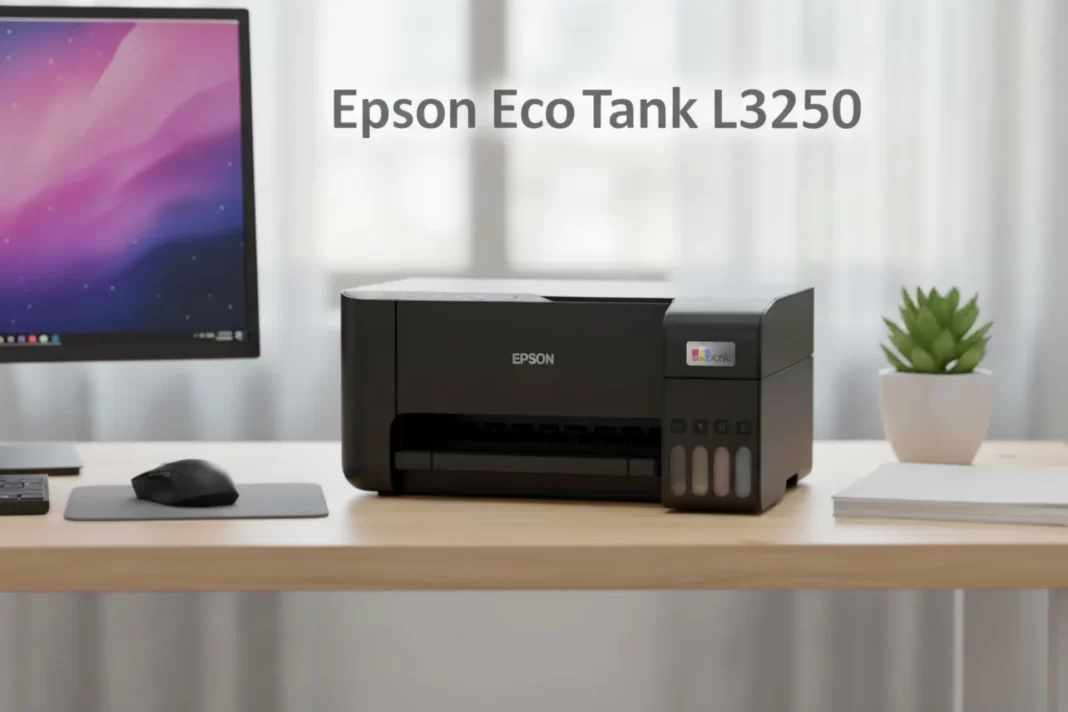
Epsons EcoTank L3250 is a low-cost, Wi-Fi ink-tank AIO built for families, students, and home offices. Expect ~10 ipm black, 5 ipm colour, borderless 4R photos, and very cheap prints: about ₹0.09 black and ₹0.33 colour in India, with 4,500/7,500 page yields. No auto-duplex, no ADF.
Who the L3250 is for
If your week is a mix of school worksheets, forms, tickets, and the odd photo for a project, this fits. A tuition teacher or small home office printing 100–300 pages per month gets excellent value because ink costs are tiny and refills are easy. If you regularly scan stacks of pages or need automatic two-sided printing, you’ll want a step-up model with ADF and auto-duplex.
Specs at a glance
- Function: print/scan/copy
- Engine: 5760×1440 dpi, piezo printhead
- Speed (ISO): up to 10 ipm black, 5 ipm colour
- Photos: borderless up to 4R
- Connectivity: USB, Wi-Fi, Wi-Fi Direct (connect up to 8 devices)
- Yields: 4,500 black / 7,500 colour (composite) with 003 bottles
- Warranty: 1 year or 30,000 pages (whichever first)
- Duplex/ADF: manual duplex only; no ADF
- Power: ~12 W operating, 0.2 W off
All of this is straight from Epson India’s product page and brochure.
Setup, app, and connectivity
Out of the box, you fill the four tanks, run the priming routine, load paper, and finish setup in the Epson Smart Panel app on Android or iOS. The app handles first-time Wi-Fi connection, firmware updates, quick scans, and nozzle checks. If you don’t want to share your Wi-Fi, use Wi-Fi Direct and connect phones or laptops straight to the printer.
How to: Wi-Fi Direct Connect in 2 minutes
- Put the printer in Wi-Fi Direct mode (see the guide)
- On your phone, pick the Epson EcoTank L3250 network
- Open Smart Panel and finish pairing
- Print a test page. The manual’s screens walk you through it if you get stuck. Epson Support Files
Print quality and speed
Text prints look crisp enough for homework and invoices. Mixed documents with charts or logos also hold up well on plain A4. For photos, you can do borderless 4×6-inch prints; colours are decent on photo paper, but this is not a dedicated photo printer, so temper expectations for skin tones and deep shadows. The rated speeds are up to 10 ipm black and 5 ipm colour, which matches what we expect from entry EcoTank models.
Ink, yields, and true cost
The L3250 uses Epson 003 bottles. Epson quotes ~4,500 black and ~7,500 composite colour pages on ISO test patterns, and the India brochure pegs cost per print at ~₹0.09 black / ₹0.33 colour. Real life varies with coverage, but even with a 20–30% buffer, you’re still paying pennies per page.
Monthly cost scenarios (India):
- 100 pages/month: ~₹9 black-only or ~₹33 colour-heavy
- 300 pages/month: ~₹27 black-only or ~₹99 colour-heavy
- 1,000 pages/month: ~₹90 black-only or ~₹330 colour-heavy
These numbers mirror Epson’s brochure math and help you budget.
Ink IDs you’ll buy: 003 Black (C13T00V198) and 003 Cyan/Magenta/Yellow (C13T00V298/398/498) are listed in Epson’s spec sheet; don’t mix third-party inks if you care about head health and warranty.
Scanning and copying
It’s a flatbed scanner. Single sheets are easy, but there’s no ADF, so multi-page jobs take time. For double-sided prints, the driver offers manual duplex prompts: print one side, flip, and print the other. The Epson Scan 2 software lets you save to PDF and tweak resolution.
What it’s not
- Not for heavy, daily stacks (no ADF).
- Not for auto two-sided printing (manual duplex only).
- Not a pro photo printer.
If you need those, look at higher EcoTank models or office-class ink tanks.
L3250 vs rivals (India)
| Feature | Epson L3250 | HP Smart Tank 580/589 | Canon Pixma G3020 |
|---|---|---|---|
| ISO speed (black/colour) | 10 / 5 ipm | up to 12 / 5 ipm | 9.1 / 5 ipm |
| Max resolution | 5760×1440 dpi | 4800×1200 dpi | 4800×1200 dpi |
| Borderless | up to 4R | up to A4 on some SKUs | up to A4 |
| Yields (approx.) | 4,500 / 7,500 | varies by bottle set; up to 6–8k colour claims by HP materials | ~7,600 B/W, 7,700 colour |
| ADF / auto-duplex | No / No | No / Manual | No / Manual |
| Typical street price | ₹13k–₹16.5k | ₹13.5k–₹16k | ₹17k–₹20k |
Notes & sources: Epson spec/India brochure for L3250; HP India pages/spec sheets for 580/589 speeds; Canon G3020 brochure/range sheets for speeds/yields; price bands from Gadgets360 and large Indian retailers. Always check current pricing.
Which one should you pick?
- Best low running cost with simple setup: L3250.
- Slightly faster black text + HP Smart app: Smart Tank 580/589.
- Borderless up to A4 and replaceable maintenance cartridge: Canon G3020; costs more but better for frequent photo-style prints.
Troubleshooting
- Missing lines or light text: run a nozzle check, then one head clean. If still faint, wait 30 minutes and run a second clean to avoid over-purging. Epson has short videos for this.
- Manual duplex confusion: your driver can prompt for flipping; the user guide shows long-edge vs short-edge choices.
- Print weekly if you can: even a small text page keeps nozzles happy.
Buying advice for India
- Price reality: We regularly see ₹13,199–₹16,499 depending on the seller and stock. If it’s much higher, wait for a sale.
- Warranty: 1 year or 30,000 pages. Keep your purchase invoice and don’t use off-brand ink if you care about coverage.
- Ink planning: One black bottle can last months for light use. Keep a colour set handy if you print school charts and photos.
If you print a few hundred pages a month and want very cheap pages, simple Wi-Fi printing, and basic photo ability, the L3250 is a safe pick. If you need auto-duplex, an ADF, or borderless A4 photos, consider the next tier or Canon’s G3020.
Is Epson L3250 worth it for home?
Yes, if you print 100–300 pages monthly. It delivers 10 ipm black/5 ipm colour, cheap pages (₹0.09/₹0.33 in India), Wi-Fi Direct, and borderless 4R photos. Skip it if you need auto-duplex or an ADF.
What are the L3250 print costs in India?
Epson’s India brochure estimates about ₹0.09 per black page and ₹0.33 per colour page, based on ISO yields and local bottle prices. Your cost varies with coverage and media.
Does Epson L3250 support duplex?
It supports manual duplex only. The driver prompts you to flip the stack; there’s no automatic two-sided unit.
What ink bottles does the L3250 use?
Epson 003 series bottles. Rated yields are about 4,500 pages black and 7,500 composite colour under ISO tests.
Frequently Asked Questions (FAQs)
Can the L3250 print borderless photos?
Yes, up to 4R (4×6-inch) borderless.
How many devices can connect without a router?
Up to 8 devices via Wi-Fi Direct, per Epson India.
What’s the warranty?
1 year or 30,000 pages, whichever comes first.
Is it noisy or power-hungry?
Rated ~12 W operating and low standby/off draw; noise figures are listed in the brochure.
How fast is it?
Up to 10 ipm black and 5 ipm colour (ISO).
L3250 vs HP Smart Tank 589?
HP posts up to 12 ipm black/5 ipm colour and a good app; both lack ADF and auto-duplex. Pick on price and availability.
L3250 vs Canon G3020?
Canon can print borderless up to A4 and quotes ~7,600 B/W / 7,700 colour yields, but usually costs more in India.

