


What You Need to Know
- Google Search Console’s crawl stats date picker fails to open when clicking the dropdown filter arrow directly
- The workaround requires clicking beside the arrow, not on it, to trigger the date picker
- SEO professional Gagan Ghotra confirmed and documented the bug on March 9, 2026
- The issue affects all users accessing crawl stats sub-reports inside Google Search Console
Google Search Console’s crawl stats report has a confirmed UI bug as of March 9, 2026, and it is actively misleading SEOs who rely on date-filtered crawl data. If you have tried clicking a dropdown filter in the crawl stats section and got nothing, your setup is not broken. Google’s interface is. Here is exactly what is happening, who first caught it, and how to keep working without losing visibility into your crawl health.
The Bug: What Breaks and When
The crawl stats report is accessible via Settings in Google Search Console. From there, open Crawl Stats and dig into one of the individual breakdown reports. Inside these sub-reports, dropdown filters allow you to segment data by Googlebot type, response code, crawl purpose, or file type. Each dropdown has an arrow indicator.
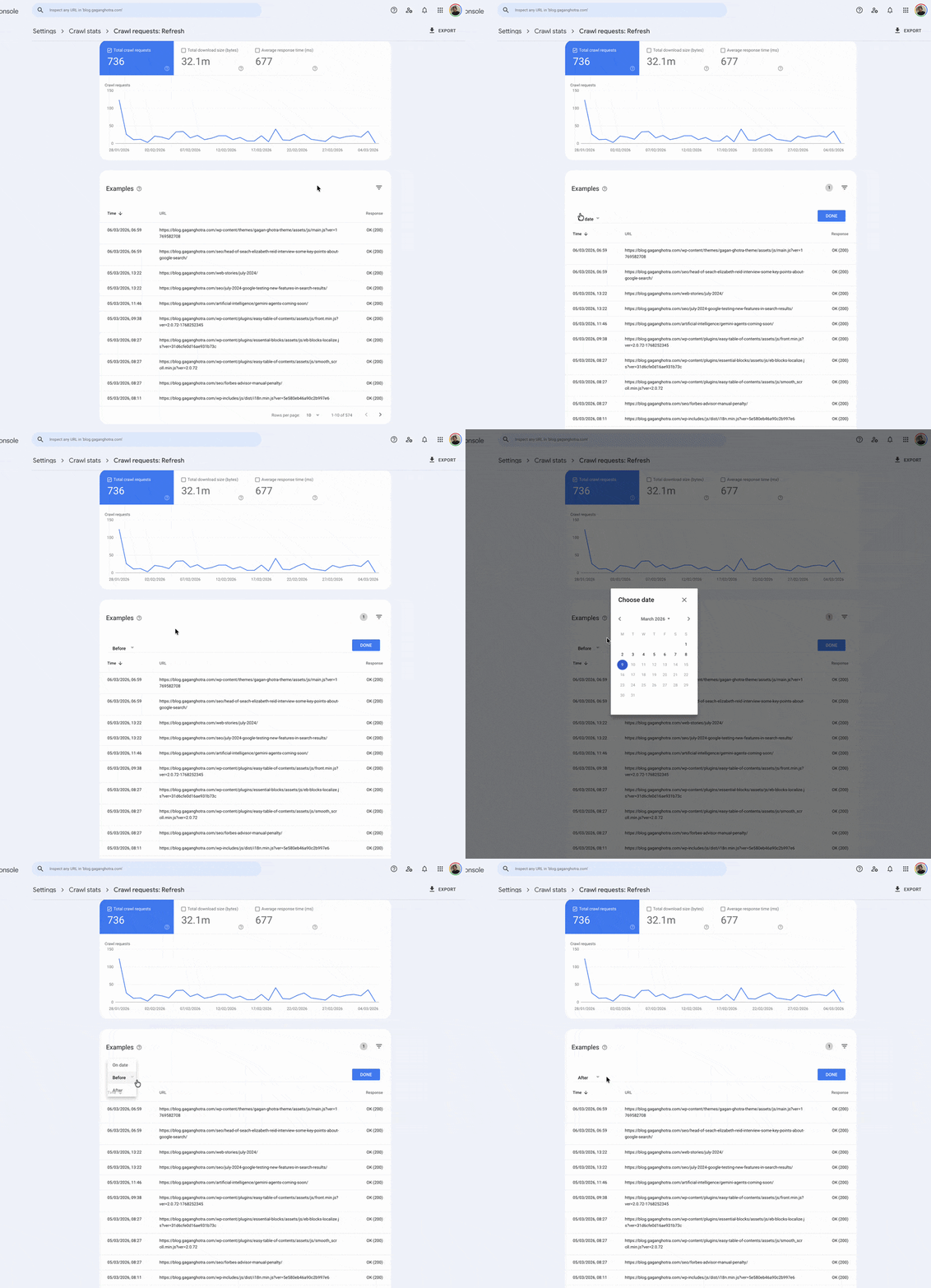
When you click directly on that dropdown arrow to open the date picker, nothing happens. The date picker does not render. The filter stays closed. This creates a false impression that the feature is unavailable or that data is missing entirely.
The fix is unintuitive: click slightly beside the arrow, not on it, and the date picker appears. This behavior points to a narrow click-target issue in the UI, where the arrow’s active trigger zone does not register clicks as expected.
 Manus AI as Your Personal Executive Assistant: 10 Prompts That Replace Hours of Admin Work
Who First Reported It
SEO professional Gagan Ghotra first flagged this bug publicly on X on March 9, 2026. His post described the issue precisely: “filters in crawl stat reports are buggy too. date picker don’t show up on clicking one of dropdown filter. have to click next to that arrow down for date picker to show up.”
Ghotra’s report is specific, reproducible, and tied to a documented UI interaction. It covers not just one filter but the entire filter set inside crawl stats sub-reports, confirming the bug is not isolated to a single dropdown.
As of March 11, 2026, Google has not issued any official statement or fix timeline for this bug.
This Is Not GSC’s First Filter Problem
This crawl stats bug fits a broader pattern of recurring UI issues inside Search Console. In October 2025, the crawl stats report showed a missing full day of data (October 14) across accounts globally, confirmed by Search Engine Land as a Google-side reporting failure. That issue resolved without an official patch announcement.
In December 2024, the Performance report’s date comparison feature broke and defaulted to incorrect date ranges instead of user-selected ones. Google addressed it after SEO community reporting escalated the issue.
GSC’s filter and date selector components have shown repeated fragility across multiple report types over the past 18 months.
Why This Bug Matters for Your SEO Workflow
The crawl stats report is one of the most underused but genuinely powerful tools in Search Console. It shows total crawl requests, response codes, file types crawled, Googlebot types, and crawl purpose breakdowns. For large sites, this data is critical for diagnosing crawl budget waste, identifying blocked resources, and catching server-side errors before they affect rankings.
When the date picker fails, you lose the ability to isolate crawl behavior within a specific time window. That is particularly damaging when you are:
- Investigating a traffic drop tied to a specific crawl period
- Verifying whether a robots.txt change took effect
- Auditing crawl frequency after a site migration
- Checking Googlebot behavior following a core algorithm update
Without date-range filtering, you are working with aggregate data only. Patterns get diluted. Anomalies become invisible.
How to Work Around the Bug Right Now
Until Google releases a fix, use this confirmed workaround to access the date picker inside crawl stats filters:
- Navigate to Settings in Google Search Console
- Click Crawl Stats, then open any sub-report
- Click a dropdown filter to open it
- Do NOT click directly on the arrow icon
- Click the area immediately beside the arrow icon
- The date picker will appear and function normally
This workaround comes directly from Gagan Ghotra’s documented report and matches the exact UI behavior he described. No browser extensions or third-party tools are required.
For additional reliability during this period, cross-reference your crawl stats with server access logs. Raw server logs record every Googlebot request with timestamps, response codes, and file types, completely independent of what GSC surfaces. This gives you a clean audit trail while the UI bug persists.
Limitations to Note
This article covers the UI-layer filter bug in crawl stats as of March 2026. Google may push a fix at any point without a public changelog update, which is standard practice for minor UI patches. If the behavior described above no longer matches what you see in your account, the fix has likely shipped. Always verify in your own GSC instance before escalating.
 Multilogin 2026: The Antidetect Browser That Manages Hundreds of Accounts Without a Single Ban
Frequently Asked Questions (FAQs)
Why is the date picker not showing up in Google Search Console crawl stats?
A confirmed bug as of March 9, 2026 causes the date picker to fail when you click directly on the dropdown filter arrow in crawl stats sub-reports. Clicking beside the arrow rather than on it triggers the date picker correctly. SEO professional Gagan Ghotra first documented this behavior publicly.
Is this bug affecting only my account or all users?
Based on Gagan Ghotra’s report, the bug affects the crawl stats filter UI across accounts. It is not isolated to a single account or browser. The issue is tied to the dropdown arrow’s click-target registration inside the sub-reports.
Where exactly is the crawl stats report in Google Search Console?
The crawl stats report is under Settings in Search Console. Select Crawl Stats, then click into any individual breakdown report such as Googlebot type or response code to access the filter dropdowns where the bug appears.
Has Google officially acknowledged this crawl stats bug?
As of March 11, 2026, Google has not issued any public statement or fix timeline for this bug. The issue was documented by Gagan Ghotra on X on March 9, 2026, but no Google spokesperson or Search Liaison has responded publicly.
Will this bug affect my actual crawl data or site indexing?
No. The bug is limited to the reporting interface. Google’s crawling of your site continues normally. Your indexing status and rankings are not impacted by this UI-layer issue in Search Console.
What is the best alternative data source while this bug persists?
Use your web server’s raw access logs. They record every Googlebot request with full timestamps, HTTP response codes, and requested URLs, all independent of Google Search Console’s reporting layer. This data is unaffected by any GSC UI bugs.
How long does Google typically take to fix GSC UI bugs like this?
Based on the December 2024 Performance report date picker bug, Google addressed the issue within a short period after the SEO community escalated it. Minor UI fixes typically ship without a public announcement or version changelog.

