

Essential Points
- Google began rolling out the new enterprise organization publishing option on February 19, 2026
- Developers can now deploy extensions privately to external organizations that approve them, directly within Chrome Web Store
- An approval link system lets organization administrators review publisher credentials before authorizing access
- Extensions must still pass Chrome Web Store’s standard review process before reaching the approved organization’s users
Google fundamentally changed how enterprise developers distribute Chrome extensions with its February 2026 update. This new private organization publishing option removes the core barrier: previously, developers could only publish extensions privately within their own organization’s domain. What follows is a complete breakdown of how the new workflow operates and what both developers and IT administrators need to do to use it.
What Changed in Chrome Web Store’s Enterprise Publishing
Before this update, enterprise extension distribution had a hard limit. Developers could publish privately using domain publishing, but that option only made the extension visible to users within their own Google Workspace organization. Reaching users in a partner or client organization required either making the extension fully public on the Chrome Web Store or using non-store installation methods such as force-install via policy.
The February 19, 2026 rollout introduces organization publishing, a structured, approval-gated workflow that makes cross-organization private distribution a native feature inside Chrome Web Store. Developers no longer need to expose sensitive internal extensions publicly just to reach external partners or clients.
 Oracle Fusion Cloud EPM Earns Gartner Leader Status: What It Means for Enterprise Finance in 2026
How the Approval Link System Works
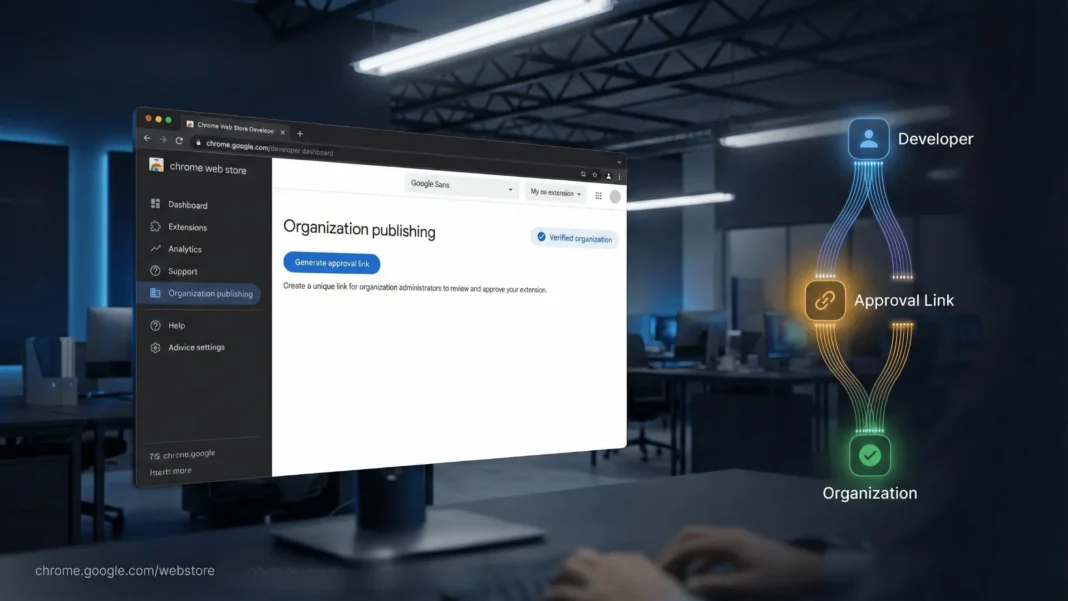
The entire workflow begins on the Account page inside the Chrome Developer Dashboard. Developers will now see a new “Organization publishing” section with a “Generate approval link” button. Clicking it produces a unique link that any organization administrator can use to approve the developer’s publisher account.
When an administrator visits the approval link, they see detailed publisher information: the publisher’s name, contact email, and trader declaration. Google recommends developers complete email verification, trader verification, and earn the publisher badge to maximize the information available on that approval page. This transparency layer is the trust mechanism that allows enterprise security teams to make an informed decision before granting access.
Once an administrator approves the developer, that developer selects the organization as a distribution target from the Distribution page during the standard publishing workflow. The extension then enters Chrome Web Store’s existing review pipeline. After passing review, it becomes visible exclusively to users within that specific approved organization.
Key Steps for Enterprise Extension Developers
Follow this sequence to activate organization publishing:
- Open the Chrome Developer Dashboard and navigate to the Account page
- Locate the “Organization publishing” section and click “Generate approval link”
- Send the approval link to the target organization’s administrator using your preferred communication channel
- Complete email verification, trader verification, and pursue the publisher badge to strengthen your approval profile
- Once approved, select the organization as the private distribution target from the Distribution page
- Submit the extension through the standard review process
- Confirm with the administrator that item-level controls are configured correctly after publication
What Organization Administrators Need to Do After Approval
Approving a developer through the link does not automatically configure access for end users. After a developer publishes privately, administrators must use existing item-level controls to manage how the extension is deployed across their organization. These controls include force-installing extensions silently so users cannot disable or remove them, setting blocklist and allowlist policies, or adding the extension to curated Collections visible in the organization’s private Chrome Web Store.
Google Workspace organizations can access their private Chrome Web Store instance at chrome.google.com/webstore/category/for_your_domain, which resolves to the correct domain based on the administrator’s login credentials. Extensions deployed via the new organization publishing option will appear in this private store for authorized users.
Chrome Web Store Enterprise Publishing: Old vs. New
| Feature | Domain Publishing (Previous) | Organization Publishing (New) |
|---|---|---|
| Scope | Own organization only | External organizations with approval |
| Access method | Domain-restricted listing | Approval link sent to external admin |
| Visibility | Users in your own organization | Only the approved external organization’s users |
| Review process | Standard CWS review | Standard CWS review |
| Admin controls post-publish | Item-level controls | Item-level controls remain in place |
Who Benefits Most From This Update
Independent software vendors building productivity, security, or workflow extensions for enterprise clients gain the most direct benefit. Rather than building a separate deployment pipeline or publishing extensions publicly to reach a single client, they now have a store-native, private distribution path with administrator oversight built in.
IT teams managing extensions across multiple Google Workspace organizations also gain a cleaner workflow. The approval link mechanism allows one published extension to be shared with each separately approved organization without duplicating listings or sacrificing visibility controls.
For organizations already using domain publishing, Collections, and force-install policies inside Google Admin Console, the new feature extends that control framework outward to cover external developer relationships. The approval step ensures administrators remain the gatekeepers for any extension entering their environment from an outside publisher.
Limitations and Considerations
The new system still requires every extension to pass Chrome Web Store’s standard review process, which introduces publishing latency before users can access the extension. The official documentation notes that review can be quicker for domain-published extensions but does not guarantee speed for the new organization publishing option. Organizations with urgent internal deployment needs may still prefer the force-install via policy approach, which bypasses the store for users entirely.
The new publishing option is also limited to organizations whose administrators have actively engaged with the approval link. There is no passive discovery or marketplace-style browsing for privately published extensions.

Frequently Asked Questions (FAQs)
What is the new Chrome Web Store enterprise publishing option?
Google launched on February 19, 2026 a new “organization publishing” feature in Chrome Web Store. It lets developers deploy Chrome extensions privately to external organizations that have approved them through a dedicated approval link. Previously, private publishing was restricted to a developer’s own Google Workspace organization only.
How does a developer generate an approval link for organization publishing?
Developers navigate to the Account page in the Chrome Developer Dashboard, locate the “Organization publishing” section, and click “Generate approval link.” The resulting link is then sent to the target organization’s administrator, who reviews the publisher’s credentials and grants approval before any extension can be published to their users.
Can any organization receive a privately published Chrome extension?
Only organizations whose administrators have explicitly approved the developer through the approval link can receive privately published extensions. The administrator reviews the developer’s publisher name, contact email, and trader declaration before granting that access.
Does a privately published enterprise extension still go through Chrome Web Store review?
Yes. Even when published exclusively to an approved organization, the extension must pass Chrome Web Store’s standard review process before it becomes visible to that organization’s users. This is the same review pipeline used for all other Chrome Web Store submissions.
What controls does an administrator have after a private extension is published?
Administrators manage privately published extensions using existing item-level controls. Options include force-installing extensions silently (users cannot disable or remove them), setting blocklist and allowlist policies, and organizing extensions into curated Collections within the organization’s private Chrome Web Store.
What is the difference between domain publishing and the new organization publishing?
Domain publishing lets developers publish to their own organization’s private Chrome Web Store, visible only to their own users. Organization publishing extends this to external organizations: a developer generates an approval link, shares it with the external admin, and once approved, selects that organization as the distribution target from the Distribution page.
Where do users in an approved organization find the privately published extension?
Users access it through their organization’s private Chrome Web Store at chrome.google.com/webstore/category/for_your_domain, signing in with their organization credentials. The private store URL resolves to the correct domain based on the user’s login.
What should developers do to make their approval page as informative as possible?
Google recommends completing email verification, finishing trader verification, and earning the publisher badge before sharing the approval link. These steps ensure the administrator sees the most complete publisher profile available, which increases the likelihood of approval from security-conscious enterprise teams.

