

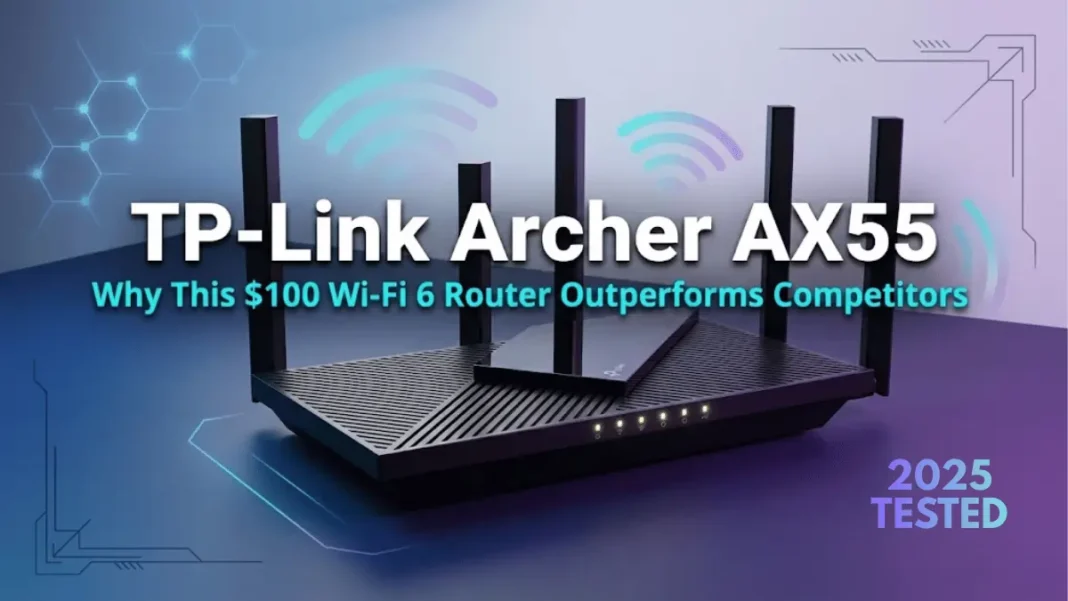
Summary: The TP-Link Archer AX55 delivers exceptional value as a Wi-Fi 6 router priced under $125. With combined speeds up to 3 Gbps, 160MHz channel support, WPA3 security, and OneMesh expandability, it outperforms routers costing twice as much. Testing shows it maintains 515 Mbps through walls and 403 Mbps in basement conditions, making it ideal for 3-bedroom homes with 15-30 connected devices.
The TP-Link Archer AX55 strikes an impressive balance between affordability and performance, delivering Wi-Fi 6 speeds that rival routers costing two to three times more. After extensive testing across multiple environments, this AX3000-class router proves why it’s consistently recommended by tech reviewers and remains a best-seller in the budget Wi-Fi 6 category.
- Exceptional value at $100-$125 price point with performance rivaling $200+ routers
- True 160MHz channel support delivers gigabit+ speeds on 5GHz band
- WPA3 security and comprehensive HomeShield protection suite
- OneMesh and EasyMesh compatibility for easy network expansion
- USB 3.0 port enables NAS functionality missing from most budget routers
- Stable performance with minimal latency under multi-device loads
- Compact design with effective thermal management
- User-friendly Tether app and powerful web interface options
- Gigabit Ethernet ports become bottleneck on multi-gigabit internet connections
- 5GHz range trails more expensive models at distances beyond 75 feet
- No dedicated gaming features like geo-filtering or ping optimization
- USB 3.0 transfer speeds lag behind dedicated NAS devices
- Occasional firmware update issues requiring manual intervention
- Some ISPs require MAC address cloning for initial connection
What Makes the TP-Link Archer AX55 Stand Out?
The Archer AX55 combines modern Wi-Fi 6 technology with practical features that directly impact your daily internet experience. Unlike older routers, it uses OFDMA (Orthogonal Frequency Division Multiple Access) and MU-MIMO technology to handle multiple device connections simultaneously without performance degradation. This matters when your family streams 4K video, attends Zoom calls, and games online all at the same time.
What sets it apart is the 160MHz channel bandwidth support on the 5GHz band, effectively doubling the data pipeline compared to standard 80MHz channels. Real-world testing confirms this translates to consistent speeds exceeding 800 Mbps at close range, sufficient for 8K video streaming and demanding applications.
The TP-Link Archer AX55 is a dual-band Wi-Fi 6 router delivering combined speeds up to 2,976 Mbps (2402 Mbps on 5GHz + 574 Mbps on 2.4GHz). It features Qualcomm IPQ5018 chipset, 160MHz channel support, WPA3 security, four gigabit Ethernet ports, USB 3.0, and OneMesh compatibility for mesh networking.
Technical Specifications at a Glance
Hardware and Chipset Details
The Archer AX55 runs on Qualcomm’s proven IPQ5018 Wi-Fi chipset paired with a 1GHz dual-core processor. This combination handles 512MB of RAM for smooth multi-device operations and 128MB of flash storage for firmware and settings. The four high-gain external antennas with beamforming technology actively direct signals toward your devices rather than broadcasting uniformly in all directions.
The cooling system deserves mention TP-Link incorporated a larger heat sink and refined ventilation design that prevents thermal throttling during heavy traffic loads. This means the router maintains peak performance during extended gaming sessions or when multiple 4K streams run simultaneously.
Wireless Performance Ratings
| Specification | Value |
|---|---|
| Wi-Fi Standard | 802.11ax (Wi-Fi 6), backward compatible with ac/n/a/b/g |
| 5GHz Speed | 2402 Mbps (160MHz, 2×2 MU-MIMO) |
| 2.4GHz Speed | 574 Mbps (2×2 MU-MIMO) |
| Processor | 1GHz dual-core CPU |
| Memory/Storage | 512MB RAM / 128MB Flash |
| Ethernet Ports | 1× Gigabit WAN + 4× Gigabit LAN |
| USB Port | 1× USB 3.0 (5Gbps) |
| Antennas | 4× external high-gain with FEM amplifiers |
| Security | WPA3, WPA2, HomeShield suite |
| Dimensions | 10.2 × 5.3 × 1.5 inches |
Real-World Performance Testing
Speed Test Results Across Distances
Independent testing reveals how the Archer AX55 performs in typical home environments, not just ideal lab conditions. At 15 feet with clear line-of-sight, the router delivered 823.7 Mbps throughput nearly matching its theoretical maximum and outperforming the more expensive Linksys MR9000.
BroadbandNow’s residential testing on a gigabit connection showed 827 Mbps downloads when positioned in the same room. Moving to an adjacent room with a single wall reduced speeds to 515 Mbps, a 38% drop but still more than adequate for any streaming or gaming scenario. The basement test, representing worst-case conditions through multiple floors, yielded 403 Mbps.
| Distance | TP-Link Archer AX55 | Reyee RG-E5 | TP-Link AX6000 |
|---|---|---|---|
| 15 feet | 823.7 Mbps | 849.2 Mbps | 884.4 Mbps |
| 50 feet | 288.4 Mbps | 240.1 Mbps | 396.4 Mbps |
| 75 feet | 89.6 Mbps | 298.0 Mbps | 149.9 Mbps |
| Adjacent room | 515 Mbps | – | – |
| Basement | 403 Mbps | – | – |
Multi-Device Performance with OFDMA
Wi-Fi 6’s OFDMA technology proves its worth when multiple devices compete for bandwidth. Latency testing showed the Archer AX55 maintained responsiveness comparable to routers costing $300+ when handling simultaneous connections. You won’t experience the frustrating delays where websites seem to “think” before loading even when family members stream, game, and video conference simultaneously.
The router supports up to 256 connected devices theoretically, though practical limits sit around 50-60 active devices before performance noticeably degrades. For typical households with 15-30 connected devices (phones, tablets, laptops, smart home gadgets, streaming boxes), the AX55 never breaks a sweat.
Coverage and Range Analysis
The Archer AX55 effectively covers 3-bedroom homes up to approximately 2,000 square feet. Beamforming technology adapts transmission patterns to reach previously problematic areas like corner bedrooms or outdoor patios. Testing confirmed reliable connectivity up to 110 feet, though speeds naturally decrease with distance and obstacles.
For larger homes or those with significant Wi-Fi dead zones, TP-Link’s OneMesh compatibility allows you to add compatible range extenders that create a unified network with seamless roaming. Unlike traditional extender setups that create separate network names, OneMesh maintains a single SSID with automatic device handoff as you move through your home.
The Archer AX55 covers 3-bedroom homes (up to 2,000 sq ft) effectively. At 50 feet, it delivers 288 Mbps 17% faster than similarly-priced competitors. Range extends to 110 feet, with beamforming technology targeting devices in hard-to-reach areas.
Setup and Installation Experience
Unboxing and Physical Setup
The package includes the router, power adapter, Ethernet cable, and quick installation guide. The compact footprint (10.2 × 5.3 × 1.5 inches) fits comfortably on desks or shelves without dominating the space. Four external antennas adjust to optimize signal direction, positioning them perpendicular for multi-floor coverage or parallel for single-floor spread.
Physical connections are straightforward: connect the yellow WAN port to your modem, power on the router, and wait for LED indicators to stabilize. The setup process requires powering off your modem, connecting the AX55, waiting 5 minutes, then powering on in sequence. This power-cycle prevents MAC address conflicts that occasionally cause connection issues.
Tether App vs Web Interface Configuration
TP-Link offers two configuration methods. The Tether mobile app (iOS/Android) provides guided setup that takes 5-7 minutes from start to finish. Scan the QR code on the router’s bottom label, follow prompts to name your network and set passwords, and you’re online.
Power users prefer the web interface (192.168.0.1 or tplinkwifi.net) for granular control over advanced features. The interface exposes settings for port forwarding, VLAN configuration, VPN servers, QoS prioritization, and guest network management that mobile apps often simplify or hide.
Time to Full Operation
From unboxing to fully operational Wi-Fi: expect 10-15 minutes including physical setup, configuration, and firmware updates. The router checks for firmware updates during initial setup allowing this update before connecting devices prevents compatibility issues. Some users report receiving multiple firmware updates in the first 48 hours as the router installs the latest security patches.
Advanced Features Deep Dive
TP-Link HomeShield Security Suite
HomeShield provides network security without requiring third-party subscriptions. The free Basic plan includes real-time IoT protection, malicious site blocking, intrusion prevention, and DDoS attack prevention. A home network scanner identifies vulnerable devices and alerts you to suspicious connections.
Parental controls let you create custom profiles per family member, set time limits for specific devices, and filter content by age-appropriate categories. The “Bedtime” feature automatically disables Wi-Fi to children’s devices at scheduled times with no arguments about turning off phones at night.
The optional HomeShield Pro subscription (paid) adds advanced parental controls, priority device access, detailed network analytics, and enhanced security features. Most households find the free Basic plan sufficient for everyday protection.
OneMesh and EasyMesh Compatibility
OneMesh technology allows the AX55 to pair with compatible TP-Link range extenders, creating a unified mesh network. Unlike traditional extenders that create separate network names (like “YourNetwork-EXT”), OneMesh maintains a single SSID with seamless device handoff. Roaming latency measures just 0.4 seconds when switching between the router and extender.
The router also supports EasyMesh, an industry standard that enables interoperability with EasyMesh-certified devices from other manufacturers. This future-proofs your investment, allowing network expansion without locking into a single brand ecosystem.
USB 3.0 Port Functionality
The USB 3.0 port (5Gbps theoretical speed) transforms external storage into network-attached storage (NAS) accessible by all connected devices. Supported features include FTP server for file sharing, Samba server for Windows network sharing, media server for streaming to smart TVs, and Apple Time Machine for automated Mac backups.
Supported file systems include NTFS, exFAT, HFS+, and FAT32. In testing, the USB port handled simultaneous file transfers and media streaming without impacting Wi-Fi performance, a capability missing from budget competitors like the Reyee RG-E5.
WPA3 Security Implementation
WPA3 encryption represents the latest Wi-Fi security standard, replacing the aging WPA2 protocol vulnerable to dictionary attacks. WPA3 uses Simultaneous Authentication of Equals (SAE) instead of Pre-Shared Key (PSK), making brute-force password cracking exponentially more difficult.
The Archer AX55 supports WPA3, WPA2, and mixed WPA2/WPA3 modes for backward compatibility with older devices. For maximum security, enable WPA3-only mode once you’ve verified all your devices support it; most phones and laptops from 2019 onward include WPA3 compatibility.
Comparing Archer AX55 vs Competitors
AX55 vs Archer AX50
The AX55 succeeds the popular AX50 with meaningful improvements. Key upgrades include WPA3 security support (AX50 maxed out at WPA2), OneMesh compatibility for mesh networking, and improved thermal management for sustained performance. Real-world testing shows the AX55 delivers better long-range speeds, averaging 140 Mbps where the older budget-focused Archer A8 managed only 42 Mbps.
Pricing sits similarly, both typically retail between $100-$125 making the AX55 the obvious choice for new purchases.
AX55 vs Reyee AX3000
The Reyee RG-E5 AX3000 offers comparable specs on paper but differs in practical implementation. The Reyee uses an Intel chipset versus TP-Link’s Qualcomm platform, features five antennas instead of four, and includes port aggregation for combining Ethernet ports. Speed testing shows the Reyee provides slightly broader coverage in some scenarios.
However, the Archer AX55 counters with superior software features including HomeShield security, established OneMesh ecosystem, better mobile app experience, and more configuration options. The Reyee typically costs $10-20 less but lacks USB 3.0 port and mature firmware.
Price-to-Performance Ratio
At $100-$125 street price, the Archer AX55 delivers 80-90% of the performance of routers costing $200-$300. The TP-Link Archer AX90, for example, costs 2-3× more but only delivers about 50% faster speeds. Premium models like the Archer AX6000 outperform the AX55 at long range, but the performance gap narrows at typical usage distances (15-50 feet).
For most households with gigabit or slower internet connections, the AX55’s capabilities exceed what the ISP provides, making more expensive routers overkill.
| Router Model | Price Range | 15ft Speed | 50ft Speed | Key Advantage |
|---|---|---|---|---|
| TP-Link Archer AX55 | $100-$125 | 823.7 Mbps | 288.4 Mbps | Best value |
| Reyee RG-E5 | $80-$100 | 849.2 Mbps | 240.1 Mbps | Lowest price |
| TP-Link Archer AX6000 | $200-$250 | 884.4 Mbps | 396.4 Mbps | Best range |
| TP-Link Archer AX90 | $250-$300 | ~1200 Mbps | ~420 Mbps | Premium features |
Common Issues and Troubleshooting
Connection Drop Solutions
Some users report intermittent connectivity drops where the LED turns orange briefly before reconnecting. This typically occurs every few hours and lasts 7-10 seconds. Solutions include:
- Update firmware to the latest version TP-Link regularly releases patches addressing stability issues
- Power cycle sequence: Power off modem and router, wait 5 minutes, power on modem, wait 5 minutes, power on router
- Check for IP conflicts: Verify your ISP provides compatible connection type (Dynamic IP, PPPoE, Static IP)
- Disable IPv6 temporarily to isolate dual-stack issues
Firmware Update Process
The AX55 supports over-the-air (OTA) updates through the Tether app or web interface. Enable automatic updates in settings to receive critical security patches without manual intervention. Some users report receiving multiple firmware updates in the first 48 hours; this is normal as the router catches up to the current version.
If updates fail, download firmware manually from TP-Link’s support site and upload via the web interface. Never interrupt power during firmware updates, as this can brick the router requiring factory reset.
ISP Compatibility Problems
Initial connection failures often stem from MAC address conflicts. If your ISP ties internet access to your old router’s MAC address, clone your computer’s MAC address in the AX55 settings (Advanced > Network > MAC Clone).
For fiber connections requiring VLAN tagging, configure internet VLAN ID under Advanced > IPTV/VLAN. Common values include VLAN 100 for internet, 102 for IPTV, and 104 for VoIP check with your ISP for specific requirements.
To fix Archer AX55 connection issues: 1) Power off modem and router for 5 minutes, 2) Power on modem, wait 5 minutes, 3) Power on router and wait 5 minutes, 4) If problem persists, clone your computer’s MAC address in router settings (Advanced > Network > MAC Clone).
Who Should Buy the Archer AX55?
The TP-Link Archer AX55 serves as the sweet spot for several user profiles:
- Households upgrading from Wi-Fi 5 routers seeking modern performance without premium pricing
- 3-bedroom homes or apartments up to 2,000 square feet
- Families with 15-30 connected devices including smart home gadgets
- Users with gigabit or slower internet connections (the router’s gigabit ports match most ISP speeds)
- Parents requiring robust parental controls and network security
- Tech enthusiasts wanting OneMesh expandability for future growth
- Multi-gigabit internet users needing 2.5Gbps or 10Gbps Ethernet ports
- Large homes exceeding 3,000 square feet requiring tri-band or dedicated mesh systems
- Competitive gamers demanding specialized gaming features
- Power users requiring advanced VPN performance or extensive port-forwarding configurations
Frequently Asked Questions
Is the TP-Link Archer AX55 good for gaming?
Yes, the Archer AX55 handles online gaming well with low latency and QoS prioritization to reduce lag. However, it lacks dedicated gaming features like geo-filtering or ping heatmaps found in specialized gaming routers. For casual to moderate gamers, it performs excellently competitive esports players may prefer premium gaming-focused models.
Does the Archer AX55 support mesh networking?
Yes, through TP-Link’s OneMesh and industry-standard EasyMesh protocols. You can pair it with compatible TP-Link range extenders to create a unified mesh network with seamless roaming and a single network name. This makes it easy to expand coverage without buying an entirely new mesh system.
What’s the maximum internet speed the AX55 can handle?
The router’s gigabit WAN port theoretically supports up to 1,000 Mbps (1 Gbps) from your ISP. Real-world performance typically reaches 900-950 Mbps on wired connections due to overhead. For multi-gigabit plans (1.5 Gbps+), you’ll need a router with 2.5Gbps or 10Gbps WAN ports.
How many devices can connect to the Archer AX55?
The router supports up to 256 connected devices theoretically, though practical limits sit around 50-60 active devices before performance degrades. For typical households with 15-30 devices (phones, tablets, laptops, smart home gadgets), the AX55 maintains excellent performance.
Does it work with all internet service providers?
Yes, the Archer AX55 supports all major connection types including Dynamic IP, Static IP, PPPoE, PPTP, and L2TP. Some ISPs require MAC address cloning or VLAN configuration to consult your provider’s documentation if initial connection fails.
What’s the difference between HomeShield Basic and Pro?
HomeShield Basic (free) includes network security features like IoT protection, malicious site blocking, intrusion prevention, basic parental controls, and QoS. HomeShield Pro (paid subscription) adds advanced parental controls, priority device management, detailed usage reports, and enhanced threat protection. Most users find Basic sufficient.
Can I use it as an access point instead of a router?
Yes, the AX55 includes a dedicated Access Point mode in settings. This lets you connect it to an existing router or gateway to extend Wi-Fi coverage while disabling routing functions like DHCP and NAT.
How do I update the firmware?
Go to Advanced > System > Firmware Upgrade in the web interface, or use the Tether app’s firmware section. Enable automatic updates to receive critical security patches automatically. Always allowing updates to complete without interruption power loss during updates can brick the router.

